











 Windows 7 Aero brings two new ways to view your
open windows. These are:
Peek, also known as Aero Peek. You can peek
behind all your open windows to see the desktop.
This will allow you to see objects on the desktop such
as shortcuts and whatever gadgets that you have
installed and running.
Computers that are purchased with Windows 7
preinstalled will not have a problem with Windows 7 Aero
but if you upgraded your computer to Windows 7 you
have to make sure that your system meets the minimum
requirement.
Minimum 1 GHz CPU for Windows 7 32-bit /64-bit,
1 GB of RAM
128 MB of Video RAM with support for DirectX 9.
If your computer does not meet these specifications then
Windows 7 Aero will not be enabled by default.
You can view a specific window that was covered by others before.
I know that there are other ways to do this in previous iterations of Windows (show desktop button)
but Windows 7 Aero makes it an easier and smoother transition.
Now you can see the desktop by moving your mouse cursor over a rectangular button located in the
very lower rightmost of the screen, just to the right of the date/time in the taskbar.
Windows 7 Aero brings two new ways to view your
open windows. These are:
Peek, also known as Aero Peek. You can peek
behind all your open windows to see the desktop.
This will allow you to see objects on the desktop such
as shortcuts and whatever gadgets that you have
installed and running.
Computers that are purchased with Windows 7
preinstalled will not have a problem with Windows 7 Aero
but if you upgraded your computer to Windows 7 you
have to make sure that your system meets the minimum
requirement.
Minimum 1 GHz CPU for Windows 7 32-bit /64-bit,
1 GB of RAM
128 MB of Video RAM with support for DirectX 9.
If your computer does not meet these specifications then
Windows 7 Aero will not be enabled by default.
You can view a specific window that was covered by others before.
I know that there are other ways to do this in previous iterations of Windows (show desktop button)
but Windows 7 Aero makes it an easier and smoother transition.
Now you can see the desktop by moving your mouse cursor over a rectangular button located in the
very lower rightmost of the screen, just to the right of the date/time in the taskbar.
 When you move your
mouse cursor over the
block in the lower right
corner open windows
become transparent
except for their outlines.
As shown here.
When you move your
mouse cursor over the
block in the lower right
corner open windows
become transparent
except for their outlines.
As shown here.
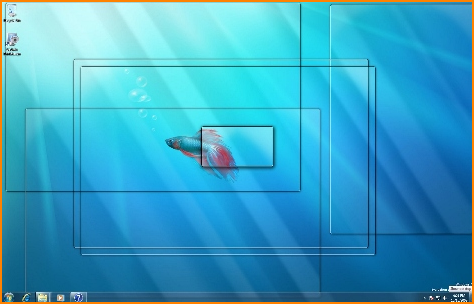 Moving your cursor away from the rectangular button will make your open windows reappear in their present positions.
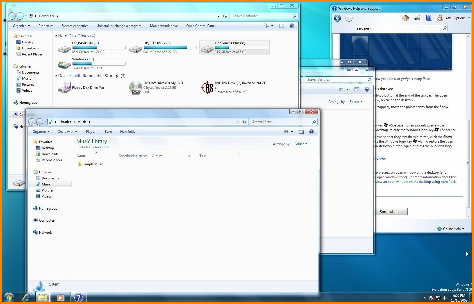 To minimize all open windows to show
only the desktop all you have to do is
click your mouse button on the
rectangular button.
Note: You can turn off the Windows 7
Aero function if you want to, returning
the function back to the previous
Windows version of show desktop. It
can be turned off in the Taskbar pane
of the Taskbar and the Start Menu
Properties window.
Full-Screen Window Preview
You can preview any of the open windows on your desktop while hiding other open windows. Move your cursor over the
taskbar button for an open application or other window. A new thumbnail appears, previewing the window in a small
thumbnail frame.
To minimize all open windows to show
only the desktop all you have to do is
click your mouse button on the
rectangular button.
Note: You can turn off the Windows 7
Aero function if you want to, returning
the function back to the previous
Windows version of show desktop. It
can be turned off in the Taskbar pane
of the Taskbar and the Start Menu
Properties window.
Full-Screen Window Preview
You can preview any of the open windows on your desktop while hiding other open windows. Move your cursor over the
taskbar button for an open application or other window. A new thumbnail appears, previewing the window in a small
thumbnail frame.
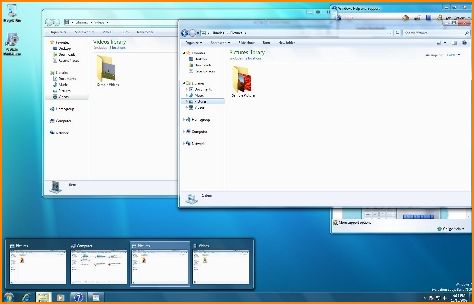 Move your mouse cursor over one of the
thumbnails. Other open windows on the screen
become hidden and show only the outlines of the
windows. Now the only window visible is the
selected window. You can select a previewed
window by clicking on its thumbnail. You can also
close a window by clicking on the red "X" in the
thumbnail.
Windows 7 Aero is available in Windows 7
versions - Home Premium, Professional and
Ultimate.
Move your mouse cursor over one of the
thumbnails. Other open windows on the screen
become hidden and show only the outlines of the
windows. Now the only window visible is the
selected window. You can select a previewed
window by clicking on its thumbnail. You can also
close a window by clicking on the red "X" in the
thumbnail.
Windows 7 Aero is available in Windows 7
versions - Home Premium, Professional and
Ultimate.
 Windows 7 Aero by PC Apprentice 2009 - 2017
 A computer once beat me at chess, but it was
no match for me at kick boxing.
-Emo Philips
-
A computer once beat me at chess, but it was
no match for me at kick boxing.
-Emo Philips
-